Sunday, 30 June 2013

How to Hide the drives(c:,d:,e:,...etc) in Ur Computer


This is a great trick you can play on your friends. To disable the display of local or networked drives when you click My Computer.

1.Go to start->run.Type regedit. Now go to:
HKEY_CURRENT_USER\Software\Microsoft\Windows\CurrentVersion\Policies\Explorer

Now in the right pane
create a new DWORD item and name it NoDrives (it is case sensitive).
Now modify it's value and set it to 3FFFFFF (Hexadecimal) .
Now restart your computer.
So, now when you click on My Computer, no drives will be shown(all gone...).

To enable display of drives in My Computer, simply delete this DWORD item that you created.Again restart your computer.You can now see all the drives again

enjoy it

Friday, 28 June 2013

C program to find hcf and lcm

simple C programming code :

#include <stdio.h>
int main() {
 int a, b, x, y, t, gcd, lcm;
 printf("Enter two integers\n");
 scanf("%d%d", &x, &y);
 a = x;
 b = y;
  while (b != 0) {
    t = b;
    b = a % b;
    a = t;
  }
  gcd = a;
  lcm = (x*y)/gcd;
  printf("Greatest common divisor of %d and %d = %d\n", x, y, gcd);
  printf("Least common multiple of %d and %d = %d\n", x, y, lcm);
  return 0;
}

C program to find hcf and lcm using recursion

here is the source code
#include <stdio.h>
 
long gcd(long, long);
 int main() {
  long x, y, hcf, lcm;
  printf("Enter two integers\n");
  scanf("%ld%ld", &x, &y);
  hcf = gcd(x, y);
  lcm = (x*y)/hcf;
   printf("Greatest common divisor of %ld and %ld = %ld\n", x, y, hcf);
  printf("Least common multiple of %ld and %ld = %ld\n", x, y, lcm);
  return 0;
}
 
long gcd(long a, long b) {
  if (b == 0) {
    return a;
  }
  else {
    return gcd(b, a % b);
  }
}

C program to find hcf and lcm using function :
here is the source code

#include <stdio.h>
 long gcd(long, long);
 int main() {
 long x, y, hcf, lcm;
 printf("Enter two integers\n");
 scanf("%ld%ld", &x, &y);
  hcf = gcd(x, y);
  lcm = (x*y)/hcf;
  printf("Greatest common divisor of %ld and %ld = %ld\n", x, y, hcf);
  printf("Least common multiple of %ld and %ld = %ld\n", x, y, lcm);
  return 0;
}
 long gcd(long x, long y) {
  if (x == 0) {
    return y;
  }
 while (y != 0) {
    if (x > y) {
      x = x - y;
    }
    else {
      y = y - x;
    }
  }
 return x;
}


Decimal to binary conversion


Here is the source code :

#include <stdio.h>

int main()
{
  int n, c, k;

  printf("Enter an integer in decimal number system\n");
  scanf("%d", &n);

  printf("%d in binary number system is:\n", n);

  for (c = 31; c >= 0; c--)
  {
    k = n >> c;

    if (k & 1)
      printf("1");
    else
      printf("0");
  }

  printf("\n");

  return 0;
}

output of this program :


Factorial program in c

here is the different methods to find factorials of a given number 

Factorial program in c using for loop :

#include <stdio.h>
 
int main()
{
  int c, n, fact = 1;
 
  printf("Enter a number to calculate it's factorial\n");
  scanf("%d", &n);
 
  for (c = 1; c <= n; c++)
    fact = fact * c;
 
  printf("Factorial of %d = %d\n", n, fact);
 
  return 0;
}

Factorial program in c using function :

#include <stdio.h>
 
long factorial(int);
 
int main()
{
  int number;
  long fact = 1;
 
  printf("Enter a number to calculate it's factorial\n");
  scanf("%d", &number);
 
  printf("%d! = %ld\n", number, factorial(number));
 
  return 0;
}
 
long factorial(int n)
{
  int c;
  long result = 1;
 
  for (c = 1; c <= n; c++)
    result = result * c;
 
  return result;
}

Factorial program in c using recursion :

#include<stdio.h>
 
long factorial(int);
 
int main()
{
  int n;
  long f;
 
  printf("Enter an integer to find factorial\n");
  scanf("%d", &n); 
 
  if (n < 0)
    printf("Negative integers are not allowed.\n");
  else
  {
    f = factorial(n);
    printf("%d! = %ld\n", n, f);
  }
 
  return 0;
}
 
long factorial(int n)
{
  if (n == 0)
    return 1;
  else
    return(n * factorial(n-1));
}


have a nice day.. keep visiting this page..:)


C program to check leap year

here is the source code :


#include <stdio.h>

int main()
{
  int year;

  printf("Enter a year to check if it is a leap year\n");
  scanf("%d", &year);

  if ( year%400 == 0)
    printf("%d is a leap year.\n", year);
  else if ( year%100 == 0)
    printf("%d is not a leap year.\n", year);
  else if ( year%4 == 0 )
    printf("%d is a leap year.\n", year);
  else
    printf("%d is not a leap year.\n", year);

  return 0;
}

Thursday, 27 June 2013

C program to check whether input alphabet is a vowel or not

here is the simple code


#include <stdio.h>

int main()
{
  char ch;

  printf("Enter a character\n");
  scanf("%c", &ch);

  if (ch == 'a' || ch == 'A' || ch == 'e' || ch == 'E' || ch == 'i' || ch == 'I' || ch =='o' || ch=='O' || ch == 'u' || ch == 'U')
    printf("%c is a vowel.\n", ch);
  else
    printf("%c is not a vowel.\n", ch);

  return 0;
}


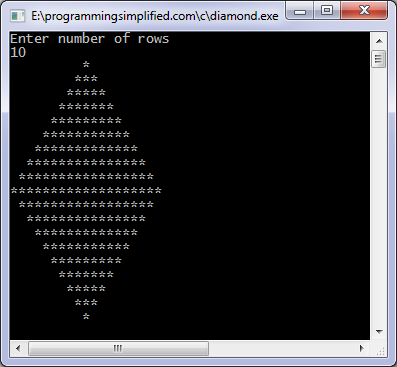
C program to print diamond pattern

here is source code for that

#include <stdio.h>
#include<conio.h>
 
int main()
{
  int n, c, k, space = 1;
 
  printf("Enter number of rows\n");
  scanf("%d", &n);
 
  space = n - 1;
 
  for (k = 1; k <= n; k++)
  {
    for (c = 1; c <= space; c++)
      printf(" ");
 
    space--;
 
    for (c = 1; c <= 2*k-1; c++)
      printf("*");
 
    printf("\n");
  }
 
  space = 1;
 
  for (k = 1; k <= n - 1; k++)
  {
    for (c = 1; c <= space; c++)
      printf(" ");
 
    space++;
 
    for (c = 1 ; c <= 2*(n-k)-1; c++)
      printf("*");
 
    printf("\n");
  }
 
  return 0;
}

output of above program
Diamond c program

c program to check odd or even numbers


Here is the different method to find the even and odd numbers....

C program to check odd or even using modulus operator

here is the simple source code for that...

#include<stdio.h>
 
main()
{
   int n;
 
   printf("Enter an integer\n");
   scanf("%d",&n);
 
   if ( n%2 == 0 )
      printf("Even\n");
   else
      printf("Odd\n");
 
   return 0;
}

C program to check odd or even using bitwise operator
#include<stdio.h>
 main()
{
   int n;
 
   printf("Enter an integer\n");
   scanf("%d",&n);
 
   if ( n & 1 == 1 )
      printf("Odd\n");
   else
      printf("Even\n");
 
   return 0;
}

Find odd or even using conditional operator


#include<stdio.h>
 main()
{
   int n;
 
   printf("Input an integer\n");
   scanf("%d",&n);
 
   n%2 == 0 ? printf("Even\n") : printf("Odd\n");
 
   return 0;
}

C program to check odd or even without using bitwise or modulus operator
#include<stdio.h>
 main()
{
   int n;
 
   printf("Enter an integer\n");
   scanf("%d",&n);
 
   if ( (n/2)*2 == n )
      printf("Even\n");
   else
      printf("Odd\n");
 
   return 0;
}

PROGRAMMING IN C LANGUAGE FOR BEGINEERS..:)


C program to perform addition, subtraction, multiplication and division...!!

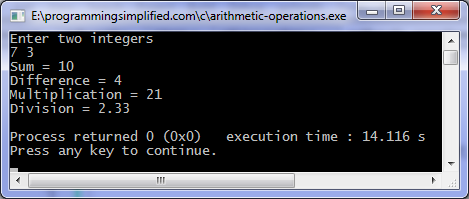
C program to perform basic arithmetic operations which are addition, subtraction, multiplication and division of two numbers. Numbers are assumed to be integers and will be entered by the user.

here is the simple source code :

#include <stdio.h>
#include<conio.h> 
int main()
{
   int first, second, add, subtract, multiply;
   float divide;
 
   printf("Enter two integers\n");
   scanf("%d%d", &first, &second);
 
   add        = first + second;
   subtract = first - second;
   multiply = first * second;
   divide     = first / (float)second;   //typecasting
 
   printf("Sum = %d\n",add);
   printf("Difference = %d\n",subtract);
   printf("Multiplication = %d\n",multiply);
   printf("Division = %.2f\n",divide);
 
   return 0;
}
the output will look like this...

arithmetic operations program


Wednesday, 26 June 2013

How to find who unfriend | Delete you on the Facebook..:)

 Now you can find that who deleted or unfriend you on the Facebook using this application called who delete me from Facebook. This application will be back up all the your  friends list that when you sign up for first time and notifies via mail you whenever there is the change in your friend list.
to see  you have go through this link  
http://www.outandin.info/

thanks to visit this blog...:)

How to increase free Facebook page like.....:)

Customize your Facebook page URL :

it is the best way through which the url of your page can be remembered by fans so they can like in future and also easy to find , choose the coolest and simplest in first time because it cant be changed again.

picture says thousand words: 

 choose a timeline cover which shows the reason of creation of page or the business use online photo editors like timeline cover maker because timeline cover is the reason of attraction of visitors of you page to like it

Put a Facebook like widget on your site (if you got one) :

The ‘Like Box’ is a social plugin that enables page owners to attract and gain Likes from their own website. The Like Box enables users to:
-  See how many users already like this Page, and which of their friends like it too


-  Read recent posts from the Page


-  Like the Page with one click, without needing to visit the Page.


Place this in your blog/website sidebar but when you do this, make sure you set the options to include ‘Facepile’. That way, you’re ‘Like box’ will show your readers how many of their friends like the page as well.


facebool age like ree


Tag other well-trafficed pages on your page post : 

for example i am posting a facebook status on my business page that we have doone a deal with ‘yyy’ company then if i will write this post with tag ‘@yyy’ then the likers of that yyy page will be also come to us after seeing our post in that page side. hope you understand.

offline promotion :

do some offline promotion man add your fb link on TV ads , business cards etc or tell your friend about your page offline so they can help you in promotion 

Ask your fans for help :

for example if your page is on 950 likes then ask your fans to help reaching 1000 give them a target and you will observe great results and also promise them some gift .


Tuesday, 25 June 2013

How To See Locked Profile Pictures In Facebook.....!!!!

How To See Locked Profile Pictures In Facebook.....!!!!


As we know that Facebook is the largest social network in this world. Facebook gave some features to hide the profile picture form someone. If someone hide the profile picture we can't able to click the picture also can't able to see full size of the picture. So in the profile picture a small picture will be shown. We can't able to zoom & click that. 

But using this simple trick we can able to see the facebook hidden profile picture. As we already seen How to Convert Any Picture Into a Facebook chat Smiley. Now we are going to see How To See Locked Profile Pictures In Facebook..??

just follow the simple steps which is given below..:)

  • Go to Facebook.
  • Then open the profile which profile picture is not enlarged.
  • Then save the locked Image URL.
  • Now you will get the URL like this.
https://m.ak.fbcdn.net/profile.ak/hprofile-ak-               ash4/c96.19.233.233/s160x160/401995_354418548000444_712249157_n.jpg
  • Then just remove the s160*160 part in the link or modify the link s160*160 to s720*720.
  • Then open the URL using browser. Now you will see the full size of the locked profile picture in Facebook.
  • That's it. It is very easy to see the locked profile picture in Facebook.
if u like my post than u can comment on that....thanks to all for visit my blog pages...:)
enjoy friends..:)